#Rack vs. Tower Servers
When selecting enterprise hardware, the choice between a rackmount chassis and a tower chassis is often dictated by the deployment environment rather than raw compute performance. A Dell PowerEdge R740 (rack) and a PowerEdge T640 (tower) can share the exact same motherboard, processors, and memory, yet they are designed for fundamentally different physical infrastructures.
This guide analyzes the architectural differences between these two form factors, focusing on acoustics, thermal thermodynamics, and expansion limitations.
#Form Factor and Physical Architecture
The primary distinction lies in how the chassis utilizes physical space.
#Rack Servers (Density Optimized)
Rack servers are designed to be mounted in standardized 19-inch wide server cabinets (racks). Their height is measured in Rack Units (U), where 1U equals 1.75 inches (44.45 mm).
- Orientation: Horizontal.
- Goal: Maximum compute density per square foot of floor space.
- Environment: Data centers or dedicated server closets with active climate control.
#Tower Servers (Expansion Optimized)
Tower servers resemble traditional desktop PC towers but are generally larger and heavier.
- Orientation: Vertical (standalone).
- Goal: quiet operation and ease of access without specialized furniture.
- Environment: Branch offices, under-desk deployments, or edge locations without rack infrastructure.
#Acoustics and Noise Levels
Noise pollution is the single most common complaint when deploying rack hardware in an office or home lab setting. The difference in acoustic profile is a result of fan physics.
#The Fan Size Trade-off
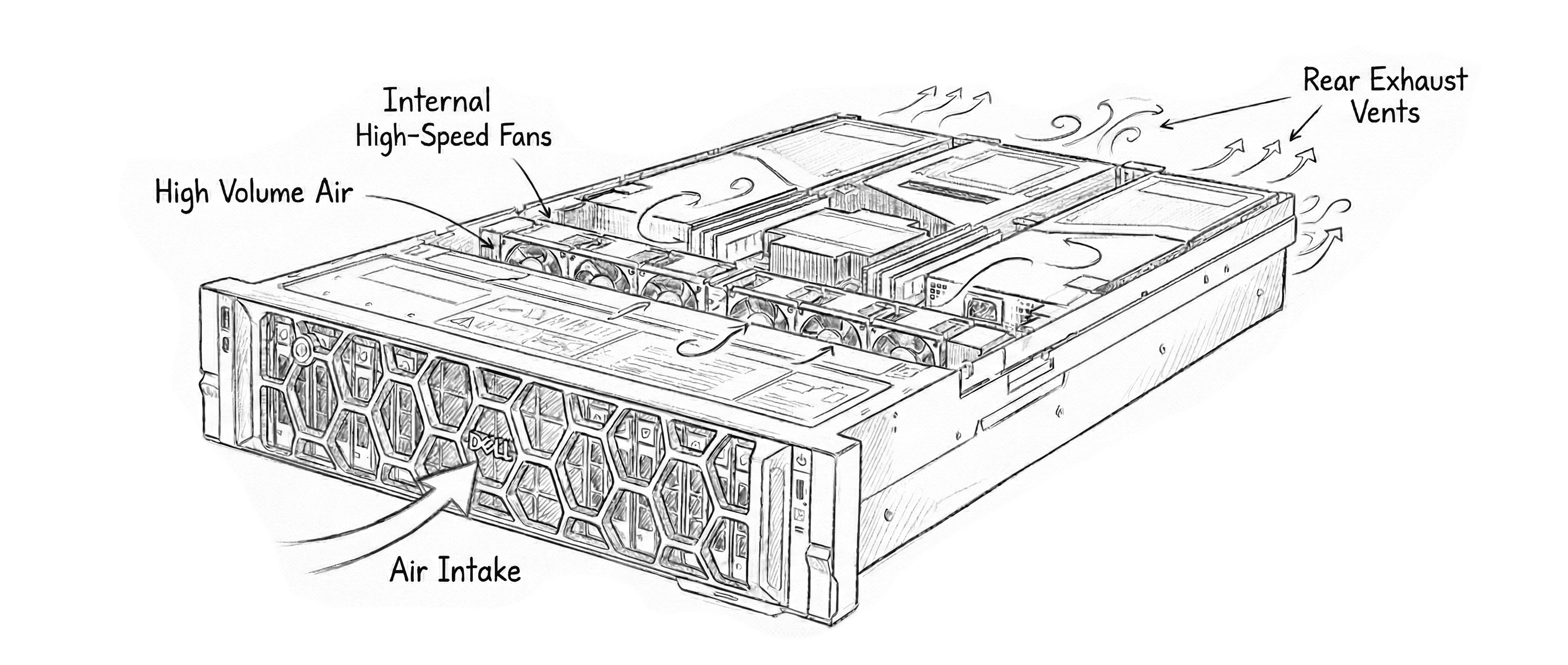
Rack servers, particularly 1U and 2U models, are vertically constrained. To move sufficient air through dense heatsinks, they must use small fans (40mm or 60mm) spinning at extremely high RPMs (10,000+ RPM). This generates a high-pitched whine and significant decibel volume, often exceeding 70 dBA under load (comparable to a vacuum cleaner).
Tower servers utilize the width of the chassis to employ large fans (92mm or 120mm). These fans can push the same volume of air (CFM) at much lower speeds, resulting in a deeper, quieter hum. Typical tower servers operate between 30-40 dBA, which is indistinguishable from ambient office background noise.
#Thermal Management
#Rack: High Static Pressure
Rack servers are designed for “cold aisle/hot aisle” containment. The fans create high static pressure to force air through tightly packed drive bays and dense CPU heatsinks. They rely on the ambient temperature of the room being controlled (typically 20-22°C). If placed in a unventilated closet, a rack server can recirculate its own exhaust and overheat rapidly.
#Tower: High Airflow Volume
Tower chassis often feature more “dead space” inside, allowing for larger passive heatsinks on the CPUs. They rely on high-volume, low-pressure airflow. This makes them more tolerant of dusty environments or warmer ambient temperatures found in non-datacenter offices.
#Expansion Capabilities
#PCIe Slots
- Rack: Due to height restrictions, rack servers almost always use PCIe Risers (circuit boards that turn the expansion slot 90 degrees). This limits the physical height of cards. Installing full-length, double-wide GPUs in a 1U or 2U server often requires specific riser configurations or removal of drive cages.
- Tower: Towers typically mount PCIe cards directly to the motherboard in a vertical orientation. They can often accommodate multiple full-length, full-height cards (such as NVIDIA Quadro or GeForce GPUs) without requiring complex riser kits or chassis modifications.
#Storage
- Rack: Storage is usually front-loading and hot-swappable. Expanding beyond the front bays requires external Disk Enclosures (DAE/DAS) connected via SAS cables.
- Tower: Towers often support significant internal storage flexibility, sometimes allowing for 18+ 3.5-inch drives in a single chassis (e.g., Dell T640). However, hot-swap capability depends on whether the unit was ordered with a backplane or cabled drives.
#Convertibility: Rack-to-Tower and Tower-to-Rack
It is often possible to convert servers between form factors, but there are significant trade-offs regarding spatial efficiency.
#Tower-to-Rack Conversion
Most enterprise tower servers (e.g., HPE ProLiant ML350, Dell PowerEdge T640) can be mounted in a rack using a “Tower-to-Rack Conversion Kit.”
- The Trade-off: A tower server turned on its side is massive. A standard 2-socket tower server will typically consume 4U or 5U of vertical rack space. A native rack server with identical specs would only consume 2U. Therefore, racking a tower is an inefficient use of rack real estate.
#Rack-to-Tower Conversion
Rack servers can be placed on their side or mounted vertically to a wall, but they do not have “feet” or side covers by default.
- The Trade-off: While functional, the acoustic profile does not change. A rack server sitting on a desk will still sound like a jet engine. “Rack-to-Tower” kits are mostly cosmetic skins and feet to prevent the unit from tipping over.
#FAQs - Rack vs. Tower
- Are rack servers faster than tower servers?
No. If the processor, memory, and storage specifications are identical, the performance will be identical. The form factor does not influence computational speed.
- Can I use a rack server at home?
Yes, but noise is the primary limiting factor. Unless you have a dedicated, sound-insulated room or a garage, the high-frequency fan noise of a 1U or 2U server is typically unbearable for a living space.
- Do tower servers come with rack rails?
Generally, no. Tower servers are sold with feet. The rack conversion kit (ears and rails) is a separate SKU that must be purchased additionally.
- Which is better for a small business with no IT closet?
A tower server is almost always the correct choice for an office without a dedicated server room due to its acoustic dampening and thermal tolerance.